iPhone Screen Replacement Guide
Replace your cracked iPhone screen yourself and save $130-230 compared to Apple. This guide covers iPhone 8 through iPhone 15 with detailed step-by-step instructions.
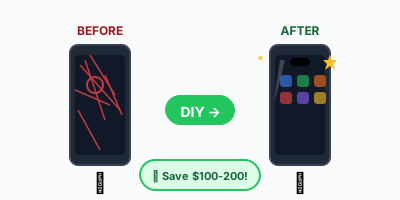
💰 Cost Comparison: DIY vs Apple
| Model | Screen Type | DIY Cost | Apple Price | You Save |
|---|---|---|---|---|
| iPhone 15 Pro Max | OLED | $180-250 | $379 | $130-200 |
| iPhone 15 Pro | OLED | $150-200 | $329 | $130-180 |
| iPhone 15/15 Plus | OLED | $100-150 | $279 | $130-180 |
| iPhone 14 Pro/Pro Max | OLED | $140-180 | $329-379 | $150-200 |
| iPhone 14/14 Plus | OLED | $80-120 | $279 | $160-200 |
| iPhone 13 Series | OLED | $60-100 | $229-329 | $130-230 |
| iPhone 12 Series | OLED | $50-90 | $229-329 | $140-240 |
| iPhone 11 | LCD | $40-70 | $199 | $130-160 |
| iPhone XR | LCD | $35-55 | $199 | $145-165 |
| iPhone X/XS | OLED | $50-80 | $279 | $200-230 |
* DIY prices are for aftermarket screens. OEM/original screens cost 20-40% more but offer better quality.
⚠️ Before You Start
- •Back up your phone - While this repair shouldn't affect data, always back up first.
- •Face ID / Touch ID: Don't damage the front sensor array or home button. These are paired to your phone and cannot be replaced.
- •Water resistance: Opening your phone breaks the waterproof seal. You can restore it with new adhesive, but it won't be factory-level.
- •True Tone: Aftermarket screens may lose True Tone. Some tools can transfer the serial data to restore it.
🧰 Tools & Materials Needed
For bottom screws
For display connectors
For internal brackets
For disconnecting cables safely
For lifting screen
For handling small screws
LCD or OLED - match your model
Waterproof gasket for reassembly
Hair dryer or heat pad
Keeps screws organized by step
💡 Pro tip: Buy a screen repair kit that includes all tools + the screen. Usually $5-15 more than screen alone but much more convenient.
Step-by-Step Instructions
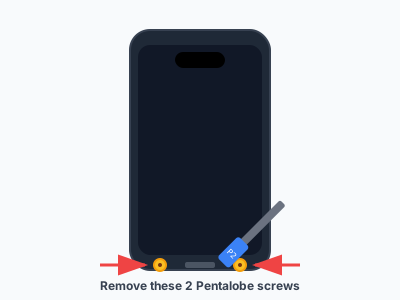
Start by completely powering off your iPhone (hold Power + Volume Down, slide to power off).
**Remove the two pentalobe screws** at the bottom of the phone, on either side of the charging port.
These screws are tiny (3.5-3.7mm) - work over a white surface and use a magnetic mat to keep them organized.
⚠️ Warning: Make sure phone is completely off. Never work on a powered device.
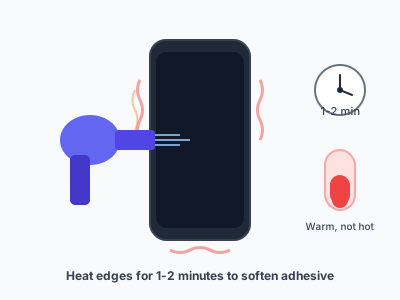
The screen is sealed to the frame with adhesive. Heating softens it for easier removal.
**Use a hair dryer on low** for 1-2 minutes around all edges, or use an iOpener/heat pad.
Focus especially on the bottom edge where the adhesive is strongest. The phone should be warm but not hot to touch.
💡 Tip: Don't overheat - 60-80°C (140-175°F) is ideal. Too much heat can damage the battery.
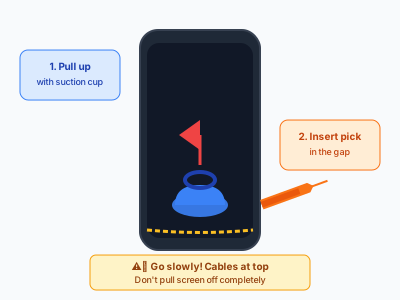
**Attach the suction cup** to the lower portion of the screen, just above the home button area (or bottom edge on Face ID models).
Pull up firmly while inserting a plastic pry tool into the gap that forms at the bottom edge.
**Slide the pry tool** along the bottom edge to release the clips. You'll hear/feel small clicks as they release.
**Important:** On newer iPhones, the screen opens like a book from the left side. On iPhone 6-7, it opens from the bottom.
⚠️ Warning: Go slowly! The display cables at the top are short. Don't pull the screen off completely.
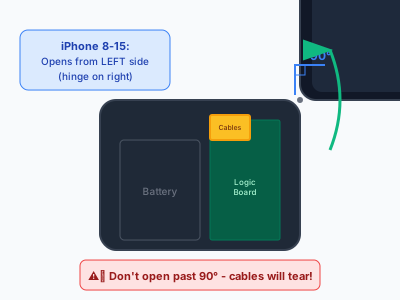
Once the clips are released, **gently open the screen like a book**.
- **iPhone 8-15:** Opens from the left side (hinge on the right)
- **iPhone 6-7:** Opens from the bottom (hinge at top)
Don't open past 90 degrees! The display cables connect at the top and can tear.
**Pro tip:** Use a small box or stand to prop the screen at ~90° while you work on the connectors.
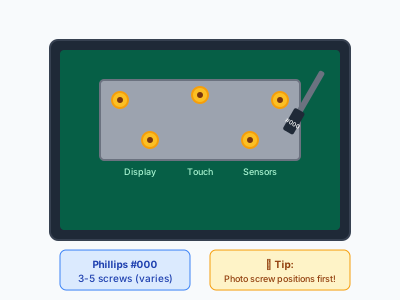
Locate the metal bracket covering the display cable connectors (upper portion of the phone).
**Remove the screws** holding the bracket in place:
- iPhone 11-15: Usually 3-4 screws (Phillips #000)
- iPhone X/XS: 5 screws
- iPhone 8: 4 screws
**Keep screws organized** - they're often different lengths! Place them on your magnetic mat in the pattern they came from.
💡 Tip: Take a photo before removing the bracket so you remember screw positions.
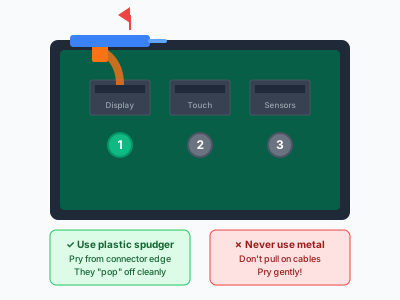
With the bracket removed, you'll see 2-3 ribbon cable connectors. These are press-fit connectors (like tiny snaps).
Use a plastic spudger to **gently pry up each connector** from the bottom edge. They'll pop off cleanly.
**Typical connectors:**
1. Display data cable (largest)
2. Digitizer/touch cable
3. Front sensor/Face ID cable (if applicable)
Don't use metal tools here - you can short circuit components or damage the connectors.
⚠️ Warning: These connectors are delicate. Pry gently from the edge, don't pull on the cables themselves.

With all cables disconnected, the screen is now free. Lift it away and set it aside.
**Before installing the new screen, transfer components** (if your replacement screen is "screen only" not a full assembly):
- Earpiece speaker
- Front camera / Face ID module
- Home button (iPhone 8 and earlier) - **MUST use original for Touch ID**
These components are held by small brackets and screws.
💡 Tip: Full screen assemblies with all components pre-installed save time but cost more.

Take your new screen assembly and connect the cables in reverse order:
1. **Connect the ribbon cables** - align each connector and press down until you feel/hear a click
2. **Replace the metal bracket** and screws
3. **Test before sealing** - power on and verify touch works, display looks correct, Face ID/Touch ID functions
If everything works, power off again.
⚠️ Warning: Test thoroughly! It's much easier to fix issues before sealing the phone.

For water resistance, apply the new adhesive gasket around the frame edge.
**Clean the frame edge** with isopropyl alcohol first to remove old adhesive residue.
Apply the new gasket (usually comes with screen or sold separately). Make sure it's positioned correctly without gaps.
💡 Tip: Skip this step if you're not concerned about water resistance. The phone will work fine without it.

**Gently close the screen** by aligning the top edge first, then pressing down along the sides until all clips snap in.
Apply firm pressure around all edges to ensure the adhesive bonds.
**Replace the two bottom pentalobe screws.** Don't overtighten.
Power on and do a final test of all functions:
- Touch response across entire screen
- Display colors and brightness
- Face ID / Touch ID
- Front camera
- Earpiece speaker
🔍 Troubleshooting
Screen doesn't turn on
Check that all ribbon cables are fully connected. They need to "click" into place. Also verify the battery connector is attached.
Touch not working / Ghost touches
Digitizer cable may be loose or damaged. Disconnect and reconnect. If persists, the screen may be defective - contact your supplier for replacement.
Display has lines or spots
Check for debris on connectors. Clean with isopropyl alcohol. If issue remains, screen may have been damaged during shipping - request replacement.
Face ID stopped working
The front sensor assembly must be transferred from your original screen. If damaged, Face ID cannot be restored - this is paired to your phone's logic board.
True Tone not working
Aftermarket screens don't have True Tone data. You can transfer it using a programmer tool, or some repair shops can do this for ~$10-20.
Not comfortable doing it yourself?
No worries! Get free quotes from trusted repair shops in your area. Most can replace your screen in under an hour.
Find Local Repair Shops →