Charging / 5-10 min
How to clean a phone charging port
Start here when a cable feels loose, charging is intermittent, or lint is packed inside the port.
Fix-it guide hub
Diagnose the problem, read the guide, then jump to a paid Amazon search for the matched repair kit, replacement part, or tool set.
Charging / 5-10 min
Start here when a cable feels loose, charging is intermittent, or lint is packed inside the port.
Battery / 30-45 min
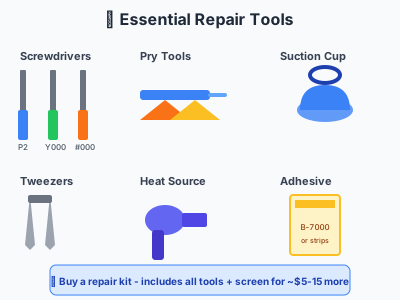
Replace a weak iPhone battery with the right battery kit, adhesive pull tabs, and opening tools.
Screen / 45-60 min
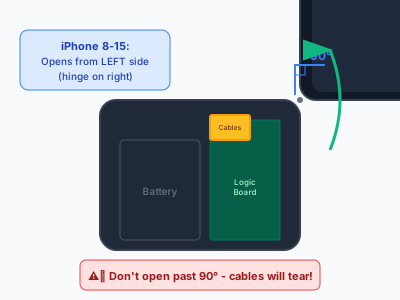
Fix a cracked display with model-matched screens, seal adhesive, suction tools, and cable safety checks.
Start with the symptom, not the shopping cart. Simple checks can avoid buying the wrong part.
Each guide points to Amazon searches for the specific part class and the supporting tools.
High-risk repairs still route to local quotes so the user has a safer path than abandoning the fix.
Guide library
Filter by problem, device, and risk level. Each result keeps the repair guide and the paid Amazon part search side by side.
10 guides shown
Start here when a cable feels loose, charging is intermittent, or lint is packed inside the port.
5-10 min
estimated time
Save $50+
possible DIY savings
Replace a weak iPhone battery with the right battery kit, adhesive pull tabs, and opening tools.
30-45 min
estimated time
Save $40-60
possible DIY savings
Fix a cracked display with model-matched screens, seal adhesive, suction tools, and cable safety checks.
45-60 min
estimated time
Save $130-230
possible DIY savings
Plan a Galaxy display repair with frame choices, back-glass adhesive, heat, and pry tools.
1-2 hours
estimated time
Save $100-200
possible DIY savings
Do the first ten minutes correctly after water exposure, then decide whether parts or pro cleaning make sense.
10 min + drying
estimated time
Save $100+
possible DIY savings
Try cable, port, force-restart, battery, and display checks before assuming the phone is dead.
10-20 min
estimated time
Save $50-200
possible DIY savings
Check battery health, cycle symptoms, and the parts needed before opening an iPhone 15 series phone.
30-45 min
estimated time
Save $50-80
possible DIY savings
Plan an S24 battery swap with back-cover heat, adhesive removal, and replacement seal supplies.
45-60 min
estimated time
Save $40-70
possible DIY savings
Know when back-glass repair is DIY-friendly and when laser removal or housing replacement is safer.
30-60 min
estimated time
Save $50-150
possible DIY savings
Find heat causes, safe cool-down steps, cleaning options, and when a battery inspection is needed.
10-20 min
estimated time
Save Free
possible DIY savings
Parts after the plan
Guide-first commerce gives shoppers confidence and keeps the site useful even when they decide not to buy parts.
Paid Amazon parts search
phone charging port cleaning kit USB C Lightning
Paid Amazon parts search
iPhone battery replacement kit adhesive pull tabs
Paid Amazon parts search
iPhone screen replacement kit adhesive tools
Paid Amazon parts search
Samsung Galaxy screen replacement kit OLED frame adhesive