Charging parts path
How to clean a phone charging port
Start here when a cable feels loose, charging is intermittent, or lint is packed inside the port.
Amazon parts catalog
Choose a FixMyStuff guide, then open the paid Amazon search for the matched replacement part, toolkit, adhesive, cleaner, or diagnostic supply.
Charging parts path
Start here when a cable feels loose, charging is intermittent, or lint is packed inside the port.
Battery parts path
Replace a weak iPhone battery with the right battery kit, adhesive pull tabs, and opening tools.
Screen parts path
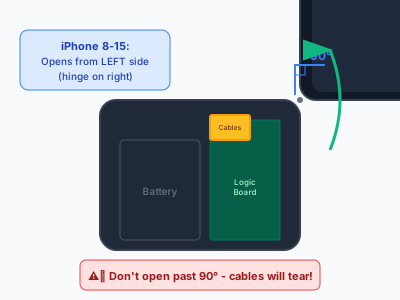
Fix a cracked display with model-matched screens, seal adhesive, suction tools, and cable safety checks.

Screen parts path
Plan a Galaxy display repair with frame choices, back-glass adhesive, heat, and pry tools.
Guide-matched searches
These are Amazon search paths, not stored inventory. The visitor checks live listings on Amazon.
Start here when a cable feels loose, charging is intermittent, or lint is packed inside the port.
Replace a weak iPhone battery with the right battery kit, adhesive pull tabs, and opening tools.
Fix a cracked display with model-matched screens, seal adhesive, suction tools, and cable safety checks.
Plan a Galaxy display repair with frame choices, back-glass adhesive, heat, and pry tools.
Do the first ten minutes correctly after water exposure, then decide whether parts or pro cleaning make sense.
Try cable, port, force-restart, battery, and display checks before assuming the phone is dead.
Check battery health, cycle symptoms, and the parts needed before opening an iPhone 15 series phone.
Plan an S24 battery swap with back-cover heat, adhesive removal, and replacement seal supplies.
Know when back-glass repair is DIY-friendly and when laser removal or housing replacement is safer.
Find heat causes, safe cool-down steps, cleaning options, and when a battery inspection is needed.
Fresh weekly catalog
Updated Oct 25, 2026 for 2026-W43. Source: generated catalog.
Restore weak battery life with a replacement battery, pull tabs, seal, and drivers.
Paid Amazon search
Replace a cracked iPhone display with the matching screen, adhesive, and opening tools.
Paid Amazon search
Find Galaxy display assemblies and back-cover opening supplies by model.
Paid Amazon search
Compare Pixel display kits, adhesives, and opening tools for current and recent models.
Paid Amazon search
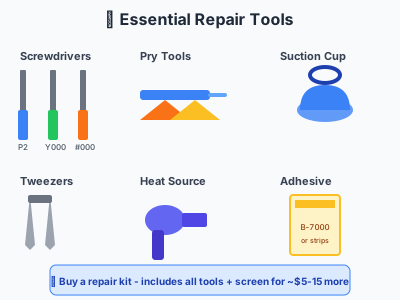
Safely lift screens and back glass without metal tools.
Paid Amazon search
Open phones, tablets, consoles, and laptops with the right bit set.
Paid Amazon search
Reseal phones after screen, battery, or back-glass work.
Paid Amazon search
Clear lint and debris before replacing a charging port.
Paid Amazon search
Soften adhesive for screen, battery, and back-glass repairs.
Paid Amazon search
Clean residue, charging ports, boards, and adhesive surfaces.
Paid Amazon search
Keep bracket screws mapped during screen and battery replacements.
Paid Amazon search
Check continuity, power issues, charging faults, and board-level clues.
Paid Amazon search
Before checkout
FixMyStuff is strongest when parts shopping is a continuation of a guide, not a disconnected product shelf.
Check 1
Use the guide first so the Amazon search matches the actual repair problem.
Check 2
Check model number, part generation, frame option, adhesive, and included tools before checkout.
Check 3
Treat price, rating, seller, delivery, and return terms as live Amazon listing details.
Check 4
Use local quotes for high-risk jobs where data, Face ID, swollen batteries, or water damage are involved.